Generowanie certyfikatów
- Generowanie certyfikatu SSL dla WIN CA, posiadającego SAN names
- Generowanie .pfx dla Windows Server starszych niż 2019
- Generowanie key oraz pem z pfx
- Generowanie certa dla IIS z WIN CA z poziomu powershell
Generowanie certyfikatu SSL dla WIN CA, posiadającego SAN names
Wykonujemy z poziomu CLI z zainstalowanym OpenSSL
openssl req -new -key server.key -out server.csr -subj "/C=XX/ST=Region/L=City/O=CompanyName/OU=Department/CN=server.domain.local/emailAddress=support@company.com" -addext "subjectAltName=DNS:server.domain.local,DNS:www.server.domain.local"Podczas podpisywania certyfikatu przez CA dodajemy w atrybutach:
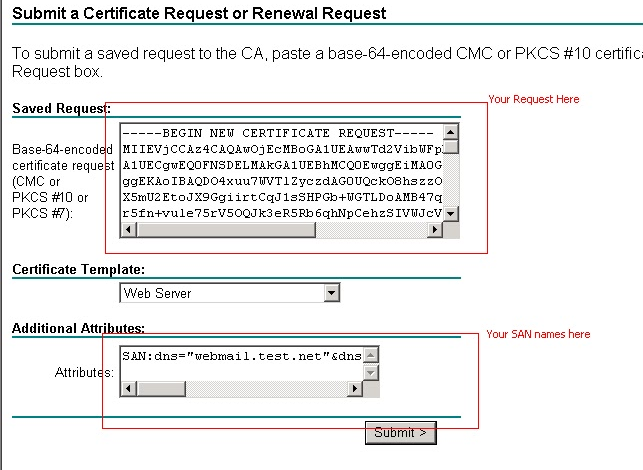
san:dns=server.domain.local&dns=server.domain.local- C (Country) – Kod kraju (np. PL dla Polski).
- ST (State/Province) – Województwo/stan.
- L (Locality/City) – Miasto.
- O (Organization) – Nazwa organizacji.
- OU (Organizational Unit) – Nazwa działu.
- CN (Common Name) – Główna nazwa domeny (np. example.com).
- emailAddress – Adres e-mail podmiotu certyfikatu.
Generowanie .pfx dla Windows Server starszych niż 2019
openssl pkcs12 -export -certpbe PBE-SHA1-3DES -keypbe PBE-SHA1-3DES -nomac -inkey cert.key -in fullchain_cert.crt -out cert.pfx Generowanie key oraz pem z pfx
Komendy potrzebne jeżeli z pliku *.pfx chcemy wygenerować pliki certyfikatu w formacie crt + key wymagane m.in przez nginx
openssl pkcs12 -in myfile.pfx -nokeys -out certificate.pem openssl pkcs12 -in myfile.pfx -nocerts -out mykey.key -nodes Generowanie certa dla IIS z WIN CA z poziomu powershell
Tworzymy plik txt z odpowiednimi wpisami, tak zwany response file,
[Version]
Signature="$Windows NT$"
[NewRequest]
Subject = "CN=*.domain.local, OU=NazwaDziału, O=NazwaFirmy, L=Miejscowość, S=Województwo, C=PL"
KeySpec = 1
KeyLength = 2048
Exportable = TRUE
MachineKeySet = TRUE
SMIME = FALSE
PrivateKeyArchive = FALSE
UserProtected = FALSE
UseExistingKeySet = FALSE
ProviderName = "Microsoft RSA SChannel Cryptographic Provider"
ProviderType = 12
RequestType = PKCS10
KeyUsage = 0xa0
[EnhancedKeyUsageExtension]
OID = 1.3.6.1.5.5.7.3.1 ; OID dla Server Authentication
[Extensions]
2.5.29.17 = "{text}"

_continue_ = "dns=*.nazwa.domeny&"

[RequestAttributes]

CertificateTemplate = "TemplateIISzCA"
Generujemy na CA z poziomu powershell
certreq -submit -attrib "CertificateTemplate:WebRamirentv3" test.txt response.cer cert.p7b response.ful 